Modify Project Role Permissions
Modify Project Role Permissions
This guide explains how to edit permissions for project roles in Authorium, including module-specific permissions for the Form Builder and Collaborative Document Management (CDM) modules.
Modifying project role permissions ensures that sensitive resources are accessed only by authorized users, maintaining security and workflow integrity.
To understand the available project roles and their default permissions, see the Manage Project Roles and Permissions guide.
This guide is intended for Account Owners and Admins who need to configure project role permissions. You will learn how to:
- Identify and understand project role permissions.
- Edit permissions safely to match your project's needs.
- Apply best practices when granting high-level access.
- Manage permissions for specific modules such as Form Builder and CDM.
All permission changes are tracked. It is recommended to document modifications for auditing purposes and team management.
When to Modify Project Role Permissions
You should modify project role permissions when:
- You need to grant or restrict access to specific project resources.
- You want to adjust the capabilities of an existing project role.
- Your project structure, team composition, or security requirements change.
Before You Begin
- You must be an Account Owner or Admin to modify project role permissions.
- A project can have only one Project Owner.
- Custom project roles start with view-only permissions until updated manually.
To Modify Project Role Permissions
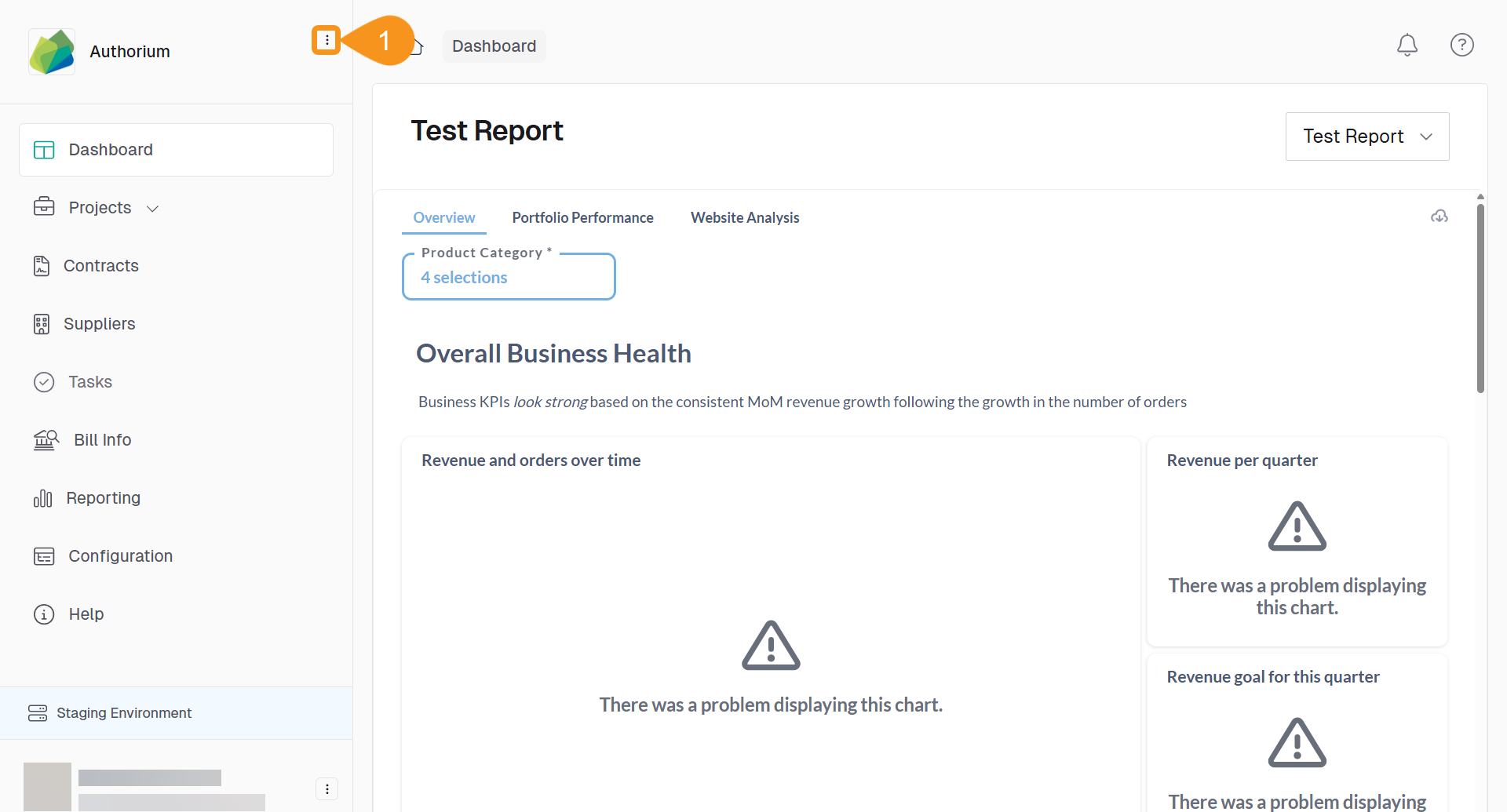
- From the Dashboard, go to the three-dots menu in the main navigation bar next to the logo.
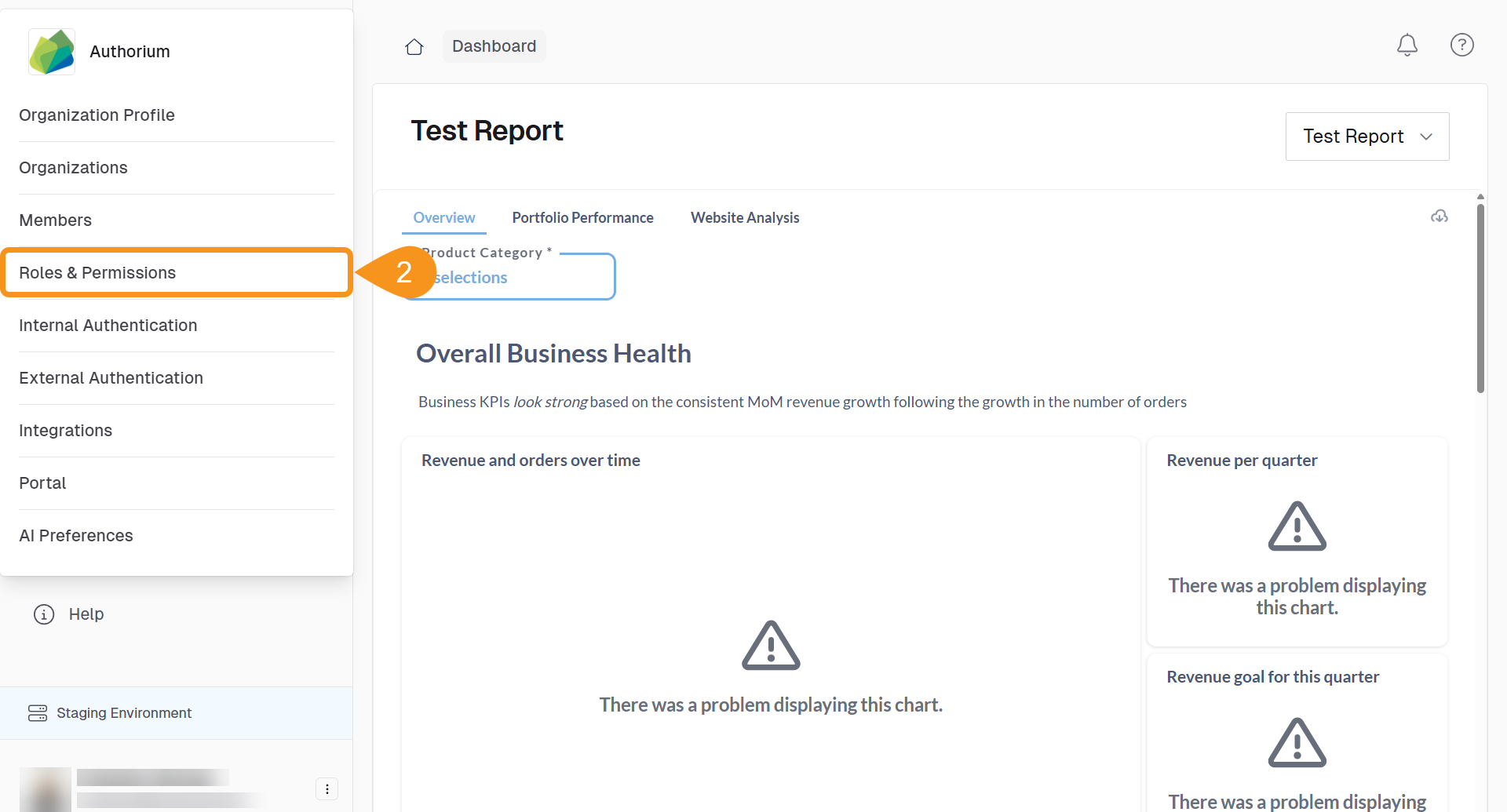
- Select Roles and Permissions.
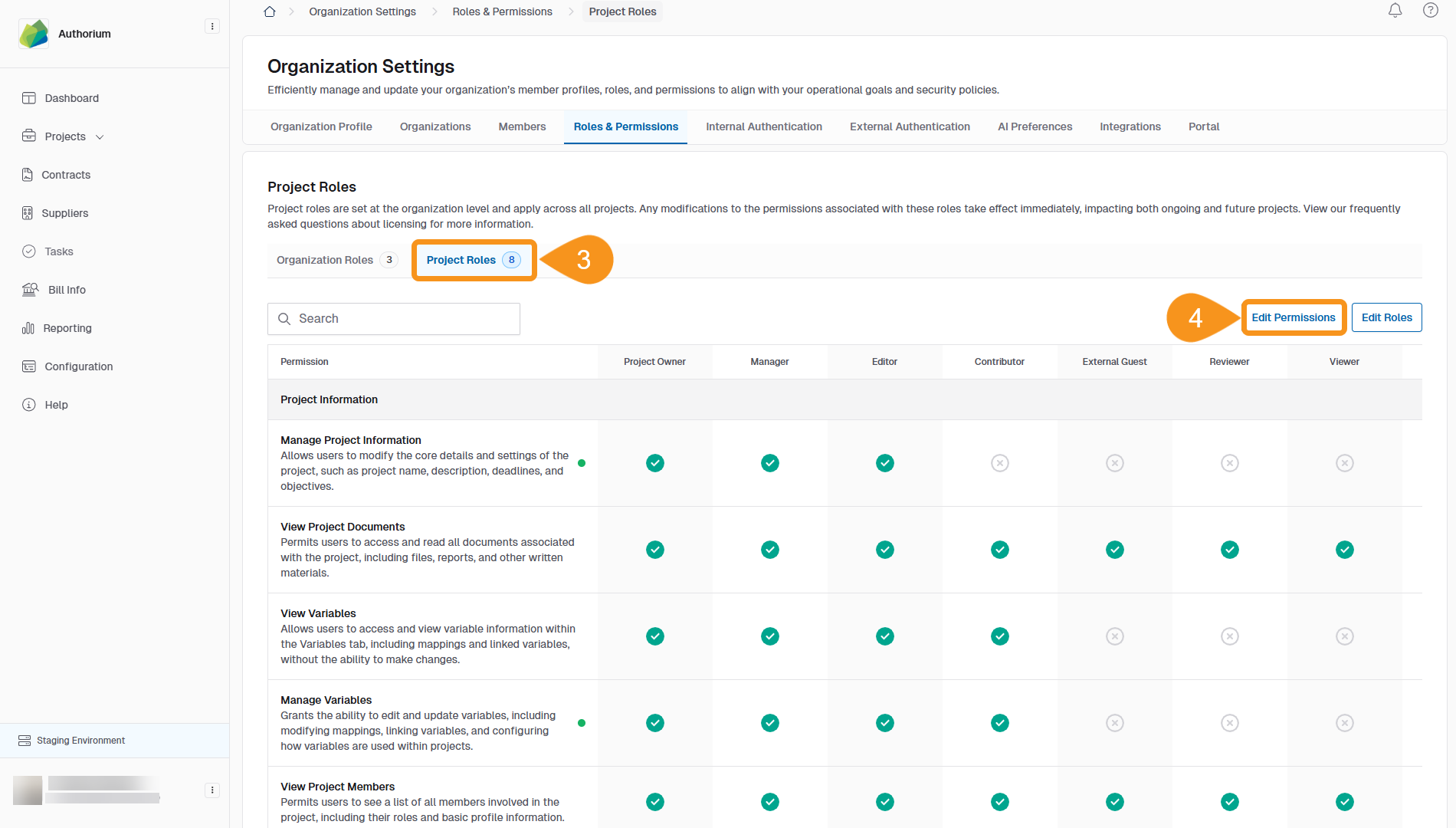
- Select the Project Roles sub-tab.
- Click Edit Permissions to enter editing mode.
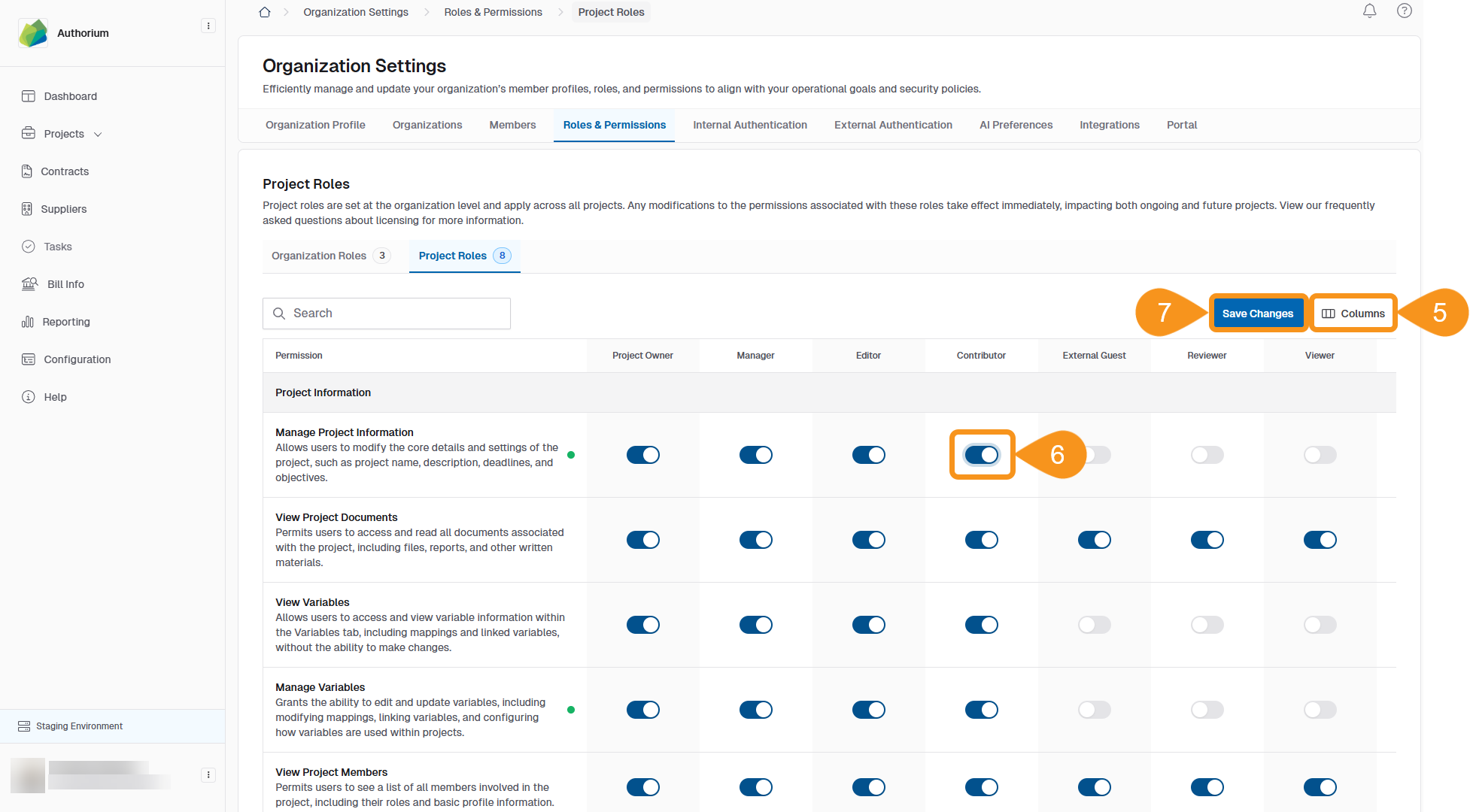
- Adjust columns to display the roles you want to edit.
- Toggle the switches to turn each permission On or Off for the selected role.
- Click Save Changes to apply your modifications.
- Users assigned to a global project role will have the same role in all modules (stages) of the project.
- Users assigned to a module-only role can only access basic project information and module content.
- A user cannot hold different roles in the global project and a module at the same time.
- The Project Owner has full access to all modules in the project by default.
Module-Specific Permissions
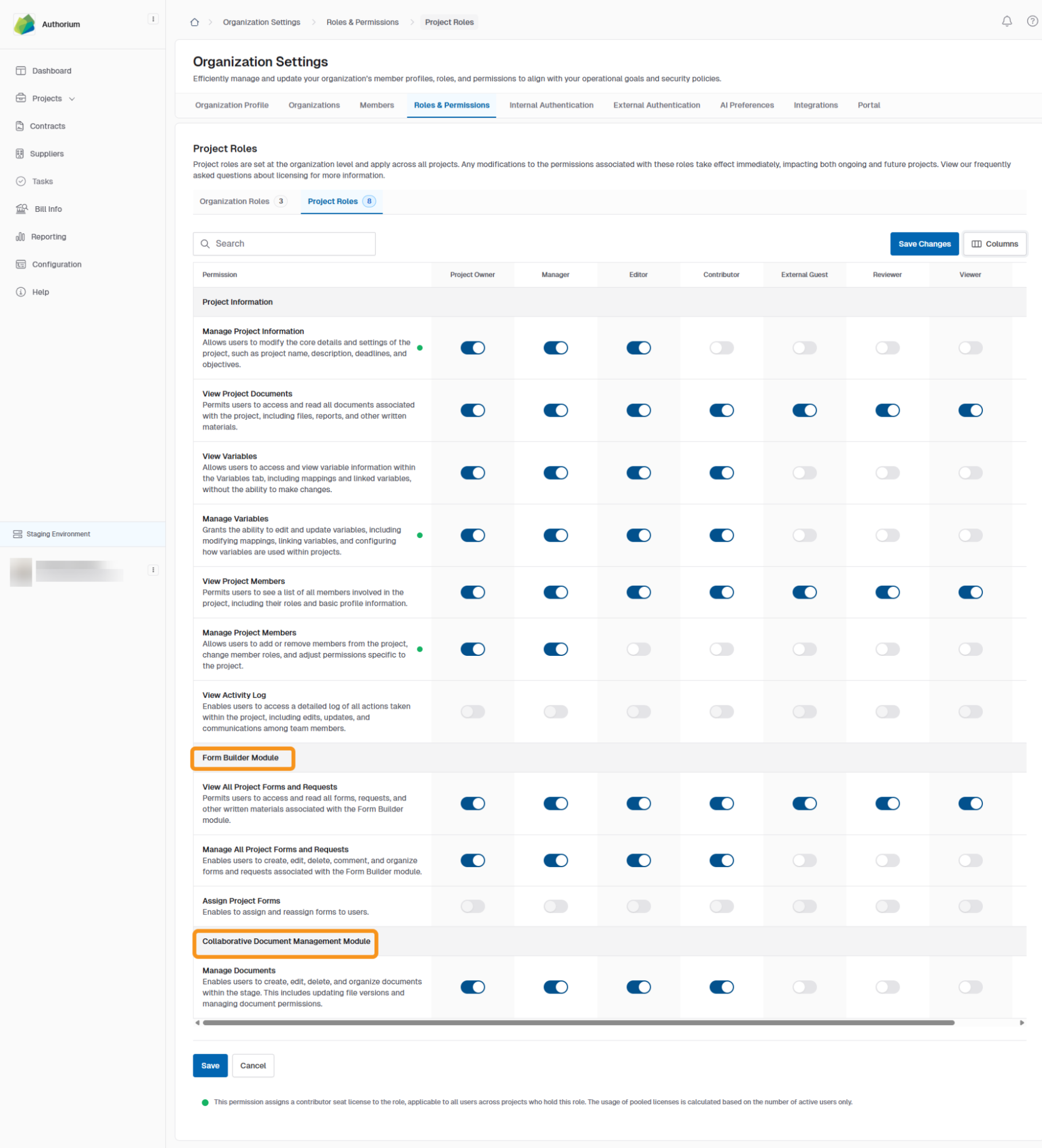
Module-specific permissions, such as those for Form Builder and Collaborative Document Management (CDM), are managed from the same Edit Permissions view described in To Modify Project Role Permissions.
Once in the editing mode, select the desired module from the permissions table to view and adjust its specific permissions, as shown in the image below.
Form Builder Module
The Form Builder Module controls permissions for creating, editing, managing, and assigning forms within a project.
Roles in Form Builder Module:
- Project Owner – Full control over project forms and requests.
- Project Manager – Can manage all project forms and requests.
- Editor – Can create, edit, and delete forms.
- Contributor – Can add and update forms but with limited administrative control.
- External Guest – Can only view project forms and requests.
- Reviewer – Can review forms but cannot make changes.
Default Form Builder Module Permissions:
| Permission | Project Owner | Project Manager | Editor | Contributor | External Guest | Reviewer |
|---|---|---|---|---|---|---|
| View All Project Forms and Requests | ✅ | ✅ | ✅ | ✅ | ✅ | ✅ |
| Manage All Project Forms and Requests | ✅ | ✅ | ✅ | ✅ | ||
| Assign Project Forms | ✅ | ✅ |
- Manage All Project Forms and Requests includes creating, editing, deleting, commenting, and organizing forms and requests.
- Assign Project Forms allows reassigning forms to different users within the project.
- Roles without management permissions have view-only access.
Collaborative Document Management (CDM) Module
The CDM Module controls permissions for creating, editing, organizing, and managing documents within a project.
Roles in CDM Module:
- Project Owner – Full control over project documents and settings.
- Project Manager – Can manage and organize project documents.
- Editor – Can create, edit, and delete documents.
- Contributor – Can add and update documents but with limited administrative control.
- External Guest – Can view documents and limited project information.
- Reviewer – Can view and review documents but cannot make changes.
Default CDM Module Permissions:
| Permission | Project Owner | Project Manager | Editor | Contributor | External Guest | Reviewer |
|---|---|---|---|---|---|---|
| View Project Documents | ✅ | ✅ | ✅ | ✅ | ✅ | ✅ |
| Manage Project Documents | ✅ | ✅ | ✅ | ✅ | ||
| View Global Project Information | ✅ | ✅ | ✅ | ✅ | ✅ | |
| Manage Global Project Information | ✅ | ✅ | ✅ | ✅ | ||
| Manage Documents (Stage Level) | ✅ | ✅ | ✅ | ✅ |
- Manage Project Documents includes creating, editing, deleting, organizing, updating file versions, and setting document permissions.
- Roles without this permission have view-only access.
- Global project permissions apply across all modules if the role is assigned at the global level.
See Also
To complement your knowledge of this process, check the following pages: